Issue 005 · 4 November 2026
Claude gets your health records, Gemini edits your files, and AI points a telescope
A patient-controlled connection brings medical records into Claude, Gemini lets you edit files in the chat, and AI agents help researchers operate a radio telescope.
This week AI moved closer to the work around the answer. It can draw on a patient's medical records, help revise a document where it was created, and even take instructions for operating a radio telescope. The promise is less shuffling between systems. The important questions are what gets access, what still needs a person, and whether the tools are available to you.
1. Claude can connect to your health records
Why it matters:
A health question usually comes with homework: find the lab result, remember the medication, and explain the history again. athenaPatient MCP is a new connection between athenahealth's patient records and Claude. MCP, or Model Context Protocol, is a standard way for an AI tool to request information from another system. With the patient's permission, Claude can refer to records including lab results, medications, allergies, visit history, and care plans. Patients sign in to athenahealth, choose what to make available, and can revoke access. athenahealth says the connection is available to Claude Pro and Max users in the United States with eligible athenahealth records. It is not a universal connection to every doctor's office.
How to use this:
If your records are eligible, review the connection and Claude's privacy settings before sharing sensitive information. Ask Claude to organize your recent results into a short list of questions for your next appointment, with a note beside anything it cannot find. Check the answers against your records and take them to a qualified clinician. AI can help you prepare; it cannot establish a diagnosis from an incomplete record.
The Bottom Line:
The possible saving is the time spent gathering your own history before an appointment. Neither company supplies a time-saved figure here, and we have not tested the connection.
2. Gemini can edit the file without leaving the chat
Why it matters:
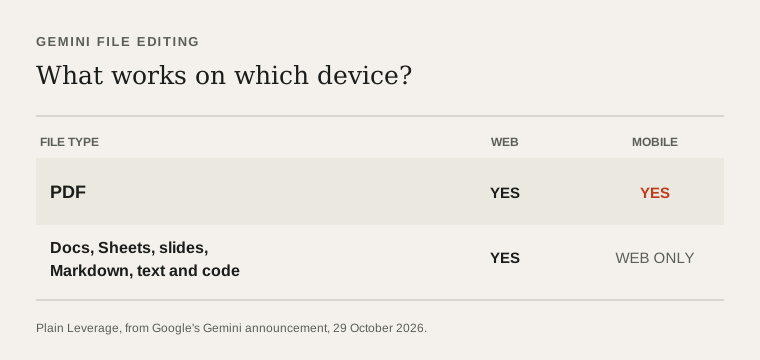
Google's Gemini file editor lets you create, preview, and revise a file inside the conversation. You can type changes yourself, highlight a passage to ask a question, or ask Gemini to refine the file. Google supports PDF preview and editing on the web and mobile. Google Docs, Sheets, slide decks, Markdown, text, and code are supported on the web. Google says the feature is available to users in the languages where the Gemini app is available.
How to use this:
Try it on a document you already need to revise. Ask Gemini for a first pass, edit a paragraph yourself, then highlight one awkward section and request a tighter version. Check the exported file and its formatting before using it for a client or team. We have not tested how complex layouts survive export.
The Bottom Line:
Fewer trips between a chat and an editor could remove a little friction from every revision. The saving depends on the file and your workflow, not a published productivity estimate.
3. Mistral releases the weights for Large 4
Why it matters:
In Issue 001, Mistral Large 4 was available as a service, with its downloadable model weights still expected. Mistral has now released those weights, the trained model files needed to run it on infrastructure you control. The model can work with text and images, and Mistral positions it for coding and other agent tasks. Its license permits a range of uses, including commercial use, but has a separate requirement for model-as-a-service businesses.
How to use this:
If your organization needs more control over where a model runs, ask your technical team or hosting provider for a comparison with your current service. Include infrastructure, operating work, and license terms in the calculation. This is a very large model, not a casual download for an ordinary laptop.
The Bottom Line:
The useful change is a choice: run or host the model yourself rather than relying only on Mistral's service. Whether that saves money depends on the hardware, usage, and support you need.
4. An AI model turned browser fixes into attacks
Why it matters:
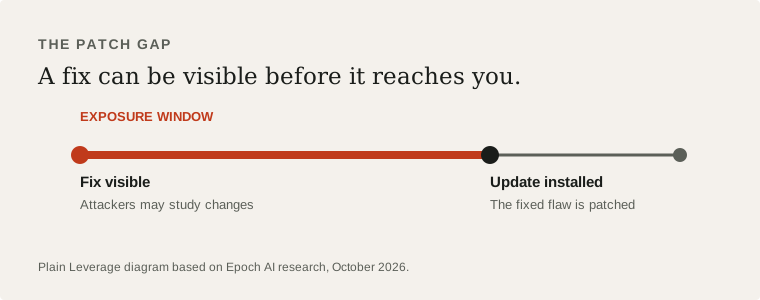
Security fixes can reveal what was broken before an update reaches every user. In a controlled test, Epoch AI used the open-weight GLM 5.3 model to exploit that interval, called the patch gap, against six recent Firefox releases. Researchers say the model built a malicious webpage that could read a file and send it to an attacker by chaining a patch-gap flaw with a separate, previously unpublished vulnerability. Mozilla patched that separate flaw in Firefox 159.0 on 27 October. This was a research test, not evidence that these attacks occurred in the wild.
How to use this:
Turn on automatic browser updates and restart when an update needs it. If you manage a team, check how quickly browsers and other critical software actually receive patches, including on devices that rarely restart. Ask suppliers how they handle the interval between a fix becoming public and reaching customers.
The Bottom Line:
Epoch reports about $1,000 per successfully attacked Firefox version after the researchers had set up the system. That is a marginal cost, not the total cost of the research. Faster patching reduces exposure; it does not guarantee safety.
5. Tencent's Hy4 can see and use a computer
Why it matters:
Tencent Hy4 adds image understanding and computer use to the company's model family. Tencent says it can interpret charts and work across command-line and graphical interfaces. It is available through hosted services, including Tencent Cloud and OpenRouter. Tencent plans to release the Hy4 model weights and a system card; those files should not be described as already released simply because the older Hy4 Preview weights are available.
How to use this:
If you evaluate AI tools for document or computer-based work, put Hy4 on the comparison list. Give it the same non-sensitive task you give another model, such as interpreting a chart and preparing a short summary. Check access, price, data handling, and output quality for your region before moving real work to it. We have not tested it.
The Bottom Line:
Another hosted model can now compete for visual and computer-based work. There is no reliable time or cost saving to claim until you compare it on your own tasks.
6. DeepSeek shows what a proactive coding agent looks like
Why it matters:
Last issue, GitHub made agentic workflows generally available. DeepSeek's dsh-superagent prototype shows a related idea in a different form: an agent watches one configured GitHub repository and can also use Feishu. When a person asks it to act, or a team-defined rule permits it, the system can create a work item, work in an isolated session, and propose a pull request, a set of code changes for review. A panel surfaces items needing a person's attention.
How to use this:
If you work with a software team, use the repository as a discussion starter. Pick one bounded task, such as sorting a recurring issue, and decide what the agent may read, when it may act, and who reviews its work. DeepSeek calls this a research prototype, not a production-ready product. It requires technical setup and we have not tested it.
The Bottom Line:
The potential saving is fewer interruptions for routine software work. The cost is setup and oversight, and there is no tested hours-saved number to promise.
7. AI agents are helping run a radio telescope
Why it matters:
At the Allen Telescope Array in California, researchers are putting agents to work on the search for signals from space. NVIDIA reports that the system can steer the instrument, correct incoming data, and apply AI models to observations from a natural-language request. Its pipeline processes data as it arrives. NVIDIA says the setup detected a pulsar in the Crab Nebula in real time. A pulsar is a rapidly spinning stellar remnant that sends out regular pulses of radiation.
What you can do with this:
Picture the same shift in any place where experts operate instruments and inspect streams of data: a researcher can ask for a sequence of actions, then examine the result. The AI is part of an observatory workflow, not an independent scientist replacing the researchers.
The Bottom Line:
A telescope can now take part of its operating instructions in ordinary language. The reported detection was a pulsar, not evidence of extraterrestrial intelligence.
Pick one task you already do and test whether an AI connection actually removes a step, while keeping sensitive data and decisions under your control.
Which of this week's developments would you try first?